Generating a ground-surface DEM from LiDAR data
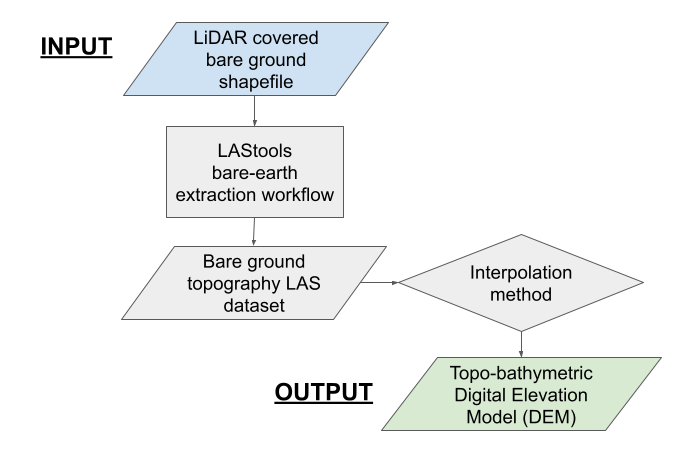
LiDAR point cloud files (LAS format) are processed using Rapidlasso LAStools functionality to remove vegetation returns, and ideally, leave a point cloud representing bare ground topography. Next, the processed point cloud is converted into a topo-bathymetric DEM using a user selected interpolation algorithm.
Note
This processing step is significantly more time consuming than any other, and can take at least an hour. We recommend using a computer with as many processing cores as possible.
Inputs
The directory containing river valley LiDAR point cloud files (Setting up)
The bare-ground shapefile created in the previous step, ground_poly.shp
The area of interest (AOI) shapefile with the desired output spatial reference frame (Setting up)
USER INPUT: RapidLasso las_ground parameters for vegetated and non-vegetated areas
Recommended starting parameters in US Feet
Step size: 0.9 (standard), 0.1 (fine)
Bulge: 0.1 (both)
Spike: 0.15 (both)
Down spike: 0.3 (both)
Offset: 0.015 (standard), 0.15 (fine)
For more information on these parameters see LAStools documentation, https://github.com/LAStools/LAStools/blob/master/bin/lasground_new_README.txt
The units that the processing parameters were entered in
The number of cores your computer has
Optional box allowing intermediate vegetation point clouds to be deleted
USER INPUT: The desired output DEM resolution in the units specified by the AOI shapefile
USER INPUT: Interpolation method (Binning or Triangulation), and sub-methods
Binning Assigns the average of all LiDAR points within a cell
If selected, choose a Void Fill Method to determine the value of cells not containing LiDAR points (‘LINEAR’, ‘SIMPLE’, or ‘NATURAL_NEIGHBOR’)
Triangulation Assigns cell values by first converting the LiDAR point cloud to a Triangulation Irregular Network (TIN), and then applying an interpolation algorithm
If selected, choose the interpolation algorithm used for TIN generation (‘LINEAR’, ‘NATURAL_NEIGHBOR’)
Triangulation is typically faster than binning, and recommended for large datasets
Note
For more information on LAS to raster interpolation methods see ArcGIS documentation, https://pro.arcgis.com/en/pro-app/latest/tool-reference/conversion/las-dataset-to-raster.htm
Relevant Outputs
A topo-bathymetric DEM in the selected resolution representing bare ground and channel topography, las_dem.tif
Applied method flow chart